SDLC
Visualizing the Complete SDLC in Taiga
—
1. Planning & Requirements Phase
This screenshot shows the initial definition and prioritization of work in the Taiga backlog.

Taiga View |
Focus |
What it Demonstrates (SDLC Goal) |
|---|---|---|
Scrum Module: Backlog |
Prioritized list of User Stories and their Epics. |
Requirements Analysis: All features are defined as User Stories. Planning: Stories are sized (Story Points) and prioritized (order). |
—
2. Implementation & Development Phase
This screenshot captures the execution of work during an active iteration (the building phase).

Taiga View |
Focus |
What it Demonstrates (SDLC Goal) |
|---|---|---|
Sprint Taskboard |
Tasks moving through workflow stages. |
Design & Implementation: User Stories are broken down into technical Tasks. Execution: The team is actively working on the code and moving work forward through stages (To Do, In Progress, etc.). |
—
3. Testing & Quality Assurance Phase
This screenshot shows how defects are managed and traced back to the requirements.

Taiga View |
Focus |
What it Demonstrates (SDLC Goal) |
|---|---|---|
Issues Module |
List of Bugs with Severity and Status. |
Testing & QA: Testers are actively finding defects. Defect Management: Bugs are logged, prioritized (Severity), and assigned. Traceability: Links/Tags connect the bug back to the original User Story. |
—
4. Deployment & Continuous Improvement Phase
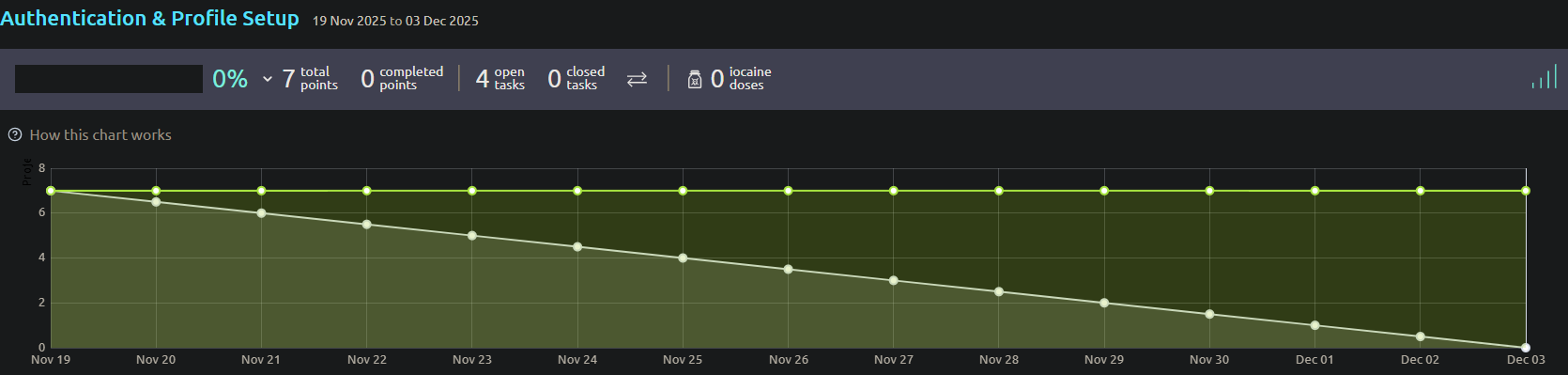
This screenshot shows the metric used to close an iteration and plan the next.
Taiga View |
Focus |
What it Demonstrates (SDLC Goal) |
|---|---|---|
Sprint View: Burndown Chart |
Work completed vs. time elapsed. |
Deployment & Maintenance: Sprints conclude, and the chart shows if the committed work was deployed on time. Continuous Improvement: Provides metrics (like velocity) used in the retrospective to plan the next iteration, closing the Agile loop. |